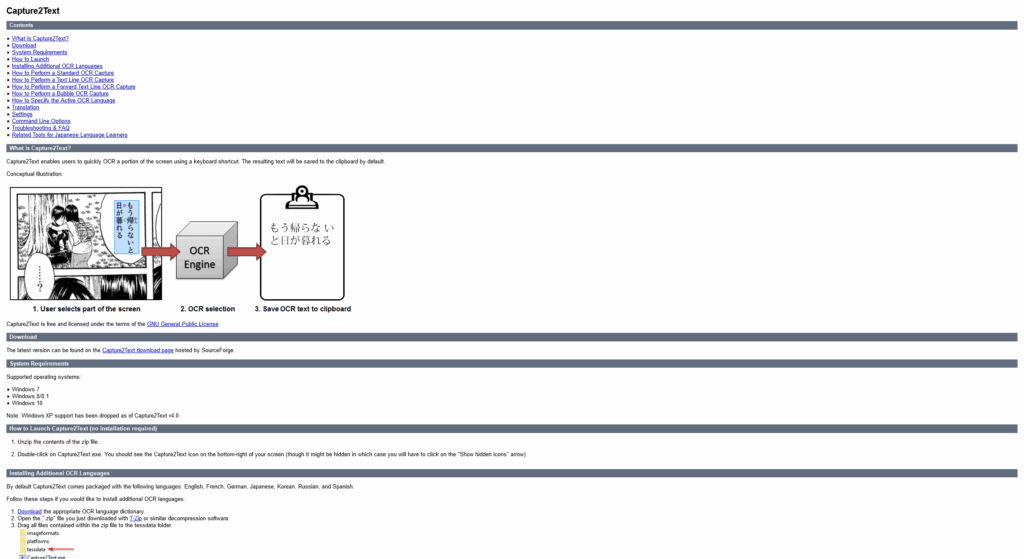
Capture2Text is the Swiss Army knife for manga translators on Windows—lightweight, no-install OCR that lets you grab text from screenshots with a keystroke. It’s perfect for quickly snatching Japanese dialogue from speech bubbles and dropping it into DeepL for instant translation. Fast, fuss-free, and basically made for weeb efficiency.
What’s on Capture2Text?
Here's what this nifty tool brings to the table:
- Screen OCR wizardry—Highlight any part of your screen with the hotkey (default: Win + Q), and Capture2Text reads the text and copies it to your clipboard. Boom. Text in a flash.
- Bubble capture mode—Perfect for messy manga pages: hover inside a speech bubble and trigger OCR, and it auto-detects that area for you.
- Multi-language OCR—Supports 30+ languages, including Japanese by default, and supports loading additional ones manually.
- Portable & keyboard-driven—No installation needed; just unzip and fire it up. You can customize hotkeys and settings for UI speeds.
- Popup preview & quick translate—You can choose to show the OCR result in a popup and even send it through Google Translate instantly.
- Perfect for raw or messy scans—Excels at grabbing text from unclean manga pages, where other OCRs stumble.
Why Capture2Text for Manga Translation?
This tool is a secret weapon if you:
- Want to grab raw Japanese text mid-panel—no typing, no retype, just select and go.
- Love keeping your reading flow—no complicated setups, just scan a bubble and move on.
- Need something light, fast, and portable that runs even on older PCs.
- Appreciate flexibility in language support and hotkey setup—dial it to your style.
User Experience
Using Capture2Text feels instant: unzip, run, and bam—the icon lives in your system tray. Hit Win + Q, drag over that bubble, and the text is copied (and maybe shown in a popup). Pro reviewers love that it works better on low-res manga raw scans than other OCR tools. It’s reliable, quick, and efficient.
Final Note + Pro Tip
Capture2Text is like your manga-sidekick—fast, silent, and perfectly suited for copying text from those shelved raws. Pair it with DeepL for translation, and suddenly you’ve got a superpowered manga translator in your pocket.
Pro Tip: Want smooth workflow? Use Capture2Text to quickly OCR bubble text, paste it into DeepL (or your translator of choice), then copy the translated line back into your image editor. It’s the classic “Capture2Text + DeepL” combo—fast, accurate, and preserves panel flow like a pro.
