How to Turn Any Japanese Manga Into English Using AI
Why would I want to know how to turn any Japanese manga into English using AI, you ask?
Well… has this ever happened to you? That manga you want to read isn’t in English. Or you’re following a series, and bam—you hit a chapter that’s pure Nihongo. Or maybe you’re trying to get ahead on One Piece just to spoil it for your friends like the menace you are, but the only Japanese you know is oppai.
So you fall to your knees and cry out to the Weeb Gods: Why, oh why is this happening to me?!

Fret not, fellow degenerate—I bring salvation.
There’s a way out, and it doesn’t involve learning Japanese.
Gone are the days of guessing the plot from the pictures alone. Thanks to new AI translation tools, you can translate Japanese manga directly into English. These tools scan each page, read the text (even vertically), and swap it out for English — inside the speech bubbles. Sugoi, isn't it?
So in this guide, I’m going to walk you through how to turn any Japanese manga into English using AI, step-by-step.
Let’s dive in.
Before We Start: Choose the Right AI Manga Translator
The first thing we need to do is pick the best translator for the job. There are several AI tools out there that specialize in translating images, and some have gotten really good at handling comics specifically.
So before we dive into how to turn any Japanese manga into English using AI, let's look at your options. Here are some of the best AI tools for translating manga…
AI Manga Translator
Try at: https://aimangatranslator.com/
Best for: Manga fans who want hassle-free translation with preserved speech bubble layouts and bulk uploads.
ImageTranslate
Try at: https://imagetranslate.com/
Best for: Translating multiple comic formats with ZIP/CBZ batch support and clean UI.
DeepL Image Translator
Try at: https://www.deepl.com/
Best for: Getting the highest quality translations when you don't mind manually overlaying text.
Scan Translator
Try at: https://scan-translator.com/
Best for: Physical manga books and printed materials (not ideal for digital images).
Mantra Engine
Try at: https://mantra.co.jp/
Best for: Professional manga publishers and serious scanlation teams with budget for enterprise-level tools.
Bonus: OCR Manga Readers on Mobile
For Android, try: OCR Manga Reader by Nikolai Krill at https://sourceforge.net/projects/ocrmangareaderforandroid/
For iOS, try: Kantan Manga app at https://apps.apple.com/us/app/kantan-manga/id1518666365
Best for: On-the-go manga reading when you just need something to work on your phone.
TL;DR: What’s the best?
Most of these tools work in a very similar way. They scan your image, detect the text, translate it, and spit out a result. It often comes down to personal preference and pricing.
For this guide, we're going with AI Manga Translator because:
- It's made specifically for manga and comic fans (they get us).
- Automatically detects Japanese text in comic pages (even vertical text).
- Preserves the original image layout — it replaces the Japanese text with translated English text inside speech bubbles.
- You can upload multiple pages at once (bulk upload for those marathon reading sessions).
- No app to install — works directly in your browser.
- Offers free usage with some limits, and paid plans if you want to process more pages.
Guide: How to Use AI Manga Translator
Next, let’s get our hands dirty. How do we actually use this tool to translate?
Before we start, just know that you can find AI Manga Translator’s official documentation on their blog here. They also have a video tutorial you can check out:
As you can see in the pic below, though, trying it out is really easy. Just upload or drop an image, select the language and the model to translate (right now, they offer ChatGPT and Gemini), then click “Have a Try”—and boom, your manga is translated.
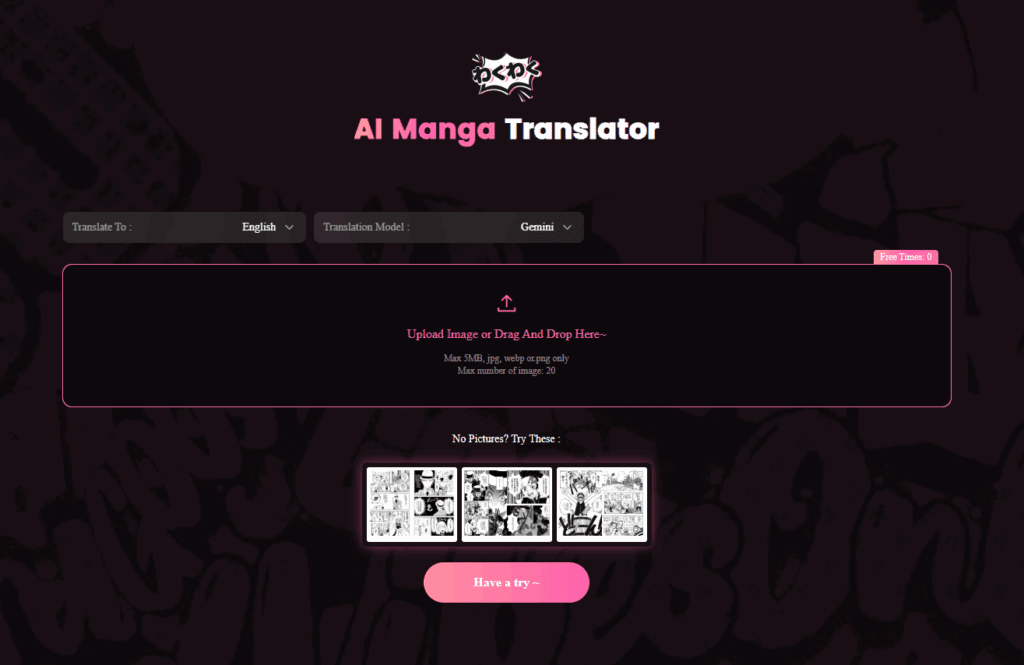
But if you want to translate more pages, you’ll need to register for an account—and you’ll have to pay once you hit the daily limit.
Here’s a quick overview of how it works:
Step-by-Step: How to Turn Any Japanese Manga Into English Using AI Manga Translator
What You Need:
- A computer
- Digital manga files (max 5MB, JPG, PNG, WEBP files only)
The Process:
1. Create an Account & Log In
Sign up with your email before uploading anything. No getting around this one.
2. Upload Your Comic Pages
Drag and drop your files or upload a compressed ZIP/CBZ file. The free plan supports batch uploads of up to 20 pages at once.
3. Choose Your Language & Model
Select Japanese → English (or whatever combo you need from their supported languages).
Select ChatGPT or Gemini as your model for AI translation.
4. Hit “Translate”
The system uses advanced OCR and speech-bubble detection to read, translate, and swap the text while keeping the original layout intact.
5. View and Download
Preview your translated pages online, then download your images.
Pro tips:
- Make sure the original scans are clear and high resolution — blurry text reduces translation accuracy.
- Their premium plans include API access and team translation features—perfect if you're running a scanlation group or just want to go full degenerate.
- If the translation isn't accurate, try re-uploading or using a different source format.
Remember, how to turn any Japanese manga into English using AI depends on having quality source material and choosing the right tool for your needs. You can start with AI Manga Translator here.
Conclusion
Knowing how to turn any Japanese manga into English using AI is easy with the right tools, and I encourage you to try a few until you find the one that’s right for you. Whatever tool you choose, you can now get ahead of the other weebs—so give AI translation a shot next time you’re in a pickle.
And if you’d like a more in-depth comparison of AI translation tools for manga, check out our blog for more recommendations!